- Clojure 96.1%
- Sass 2.8%
- JavaScript 0.7%
- HTML 0.4%
| docs | ||
| src | ||
| test/cljs/airsonic_ui | ||
| .gitignore | ||
| .joker | ||
| .travis.yml | ||
| karma.conf.js | ||
| package-lock.json | ||
| package.json | ||
| README.md | ||
| shadow-cljs.edn | ||

Airsonic Web Client 
This repository contains an alternative web frontend for airsonic. The goal is to eventually be able to fully replace the current web interface.
Implemented so far
- Login with persisting credentials
- Browse your library by newest / most recently played / starred
- Browse artists alphabetically
- A currently playing queue with next, previous, repeat and shuffle
- Information about the current track with the ability to seek
Development
The project is written in ClojureScript and uses re-frame for structure and peace of mind. The build tool is shadow-cljs, which offers nice editor integration and interoparibility with the whole JavaScript ecosystem. If you haven't worked with re-frame: I highly recommend it. Good resources are the project's docs and a post about its building blocks.
To build the project make sure you have Node.js (v6.0.0), npm and Java 8 installed in your system.
# after cloning the project, first install all dependencies
$ npm install

# start a continuous build with hot-code-reloading and continuous testing
# first build takes a while. open http://localhost:8080
$ npm run dev
Editor integration
Integrating shadow-cljs with your editor helps tremendously with development. After having run npm run dev as described above you can connect to the REPL and get features like in-editor code execution and code completion / documentation lookup. For further information see this part of the shadow-cljs user guide, which contains instructions for Emacs, Atom, VSCode and other editors. Make sure to open localhost:8080 in the browser to execute ClojureScript code.
re-frame-10x
re-frame-10x is a debugger that is bundled with the app in development mode. Once you have the build running, hit Ctrl + h and the re-frame-10x window will show up:
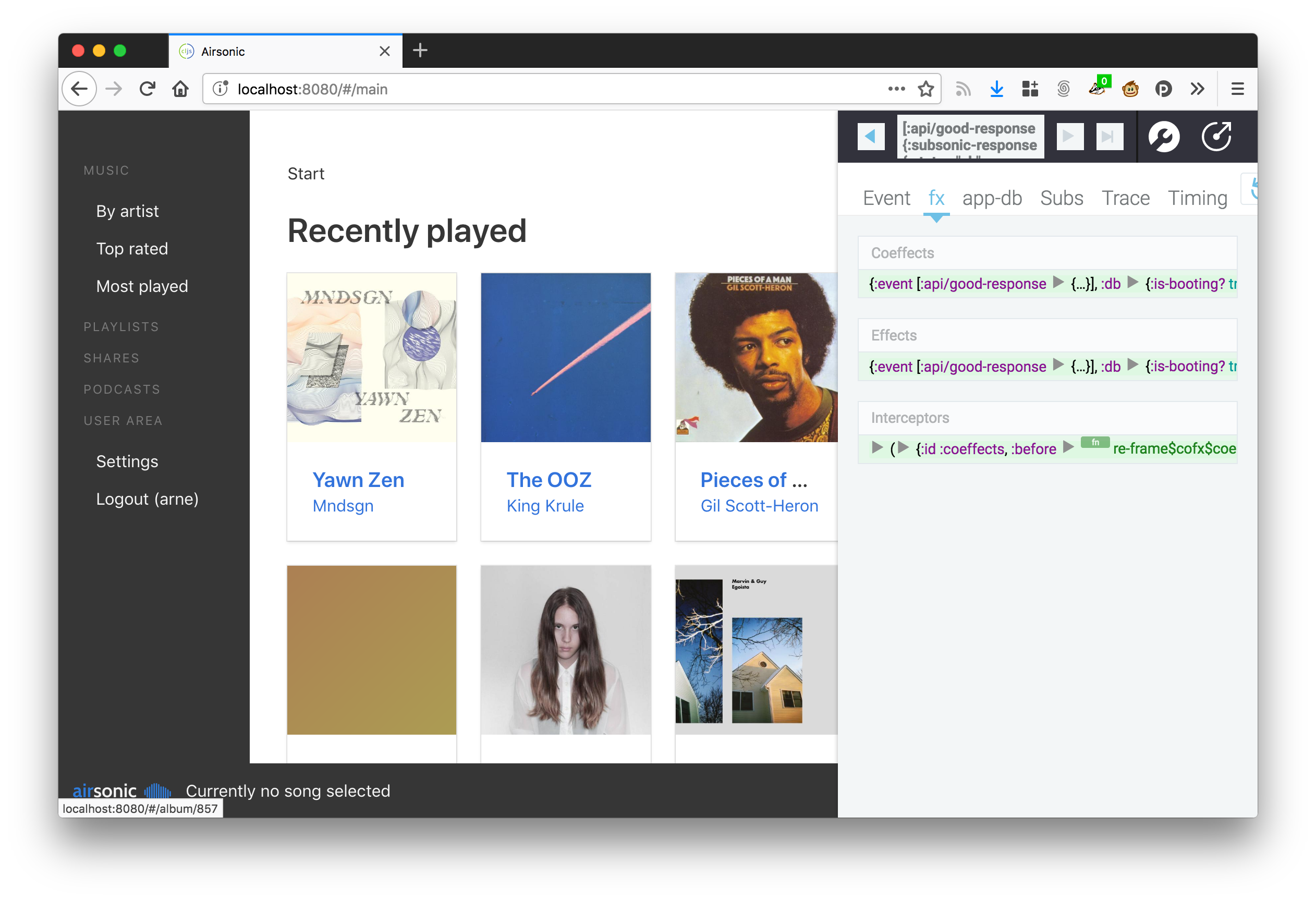
It provides you with tools to inspect the state of the application, undo and replay events, debug performance issues and more.
Tests
This project uses karma for tests. Make sure to have Google Chrome installed, otherwise the watcher will time out.
# run tests once
$ npm test
Note: If you want nice console output in your tests, make sure to (enable-console-print!). You can call println afterwards like you're used to.
Deployment
# build and optimize the code once for production
$ npm run build

# runs npm run build and publishes everything via gh-pages
$ npm run deploy
All build artifacts land in /public. Don't change anything in there as changes will be overwritten.