- Clojure 96.1%
- Sass 2.8%
- JavaScript 0.7%
- HTML 0.4%
 Arne Schlüter
fa485bbf42
Arne Schlüter
fa485bbf42
commit 4ac35d6530f7770e7b80307321c72541a55e2c8e
Author: Arne Schlüter <arne@schlueter.is>
Date:   Mon Oct 8 21:09:04 2018 +0200

    Stub out podcast detail view

commit 60742a22e93bfe6f432e06d56d3e4da671184559
Author: Arne Schlüter <arne@schlueter.is>
Date:   Tue Sep 18 23:02:39 2018 +0200

    Simplify api helpers; closes #16

commit 8bbc79ebf4dbbe3dbfa08cb4c7c1edd341d507eb
Author: Arne Schlüter <arne@schlueter.is>
Date:   Tue Sep 18 19:39:17 2018 +0200

    Adjust `stream-url` to work with podcast episodes

commit 991ba5b65230a7429c160ca1b7968ecbb8595e0b
Author: Arne Schlüter <arne@schlueter.is>
Date:   Tue Sep 18 19:14:08 2018 +0200

    Fix breadcrumbs for podcasts

commit 37c3a894eded2fe37f9af031d3132c7175702266
Author: Arne Schlüter <arne@schlueter.is>
Date:   Tue Sep 18 15:11:54 2018 +0200

    Stub out overview for podcasts
|
||
|---|---|---|
| docs | ||
| src | ||
| test/cljs/airsonic_ui | ||
| .gitignore | ||
| .joker | ||
| .travis.yml | ||
| karma.conf.js | ||
| package-lock.json | ||
| package.json | ||
| README.md | ||
| shadow-cljs.edn | ||
Airsonic Web Client 
This is just meant for exploration. If you want to see something more serious, take a look at airsonic-ui.
Implemented so far
- Login
- Welcome screen (most recently played)
- Artist detail
- Album detail
- Play Track w/ next and previous
- Currently playing notification
Development
The project is written in ClojureScript and uses re-frame for structure and peace of mind. The build tool is shadow-cljs, which offers nice editor integration and interoparibility with the whole JavaScript ecosystem. If you haven't worked with re-frame: I highly recommend it. Good resources are the project's docs and a post about its building blocks.
To build the project make sure you have Node.js (v6.0.0), npm and Java 8 installed in your system.
# after cloning the project, first install all dependencies
$ npm install

# start a continuous build with hot-code-reloading and continuous testing
# first build takes a while. open http://localhost:8080
$ npm run dev
Editor integration
Integrating shadow-cljs with your editor helps tremendously with development. After having run npm run dev as described above you can connect to the REPL and get features like in-editor code execution and code completion / documentation lookup. For further information see this part of the shadow-cljs user guide, which contains instructions for Emacs, Atom, VSCode and other editors. Make sure to open localhost:8080 in the browser to execute ClojureScript code.
re-frame-10x
re-frame-10x is a debugger that is bundled with the app in development mode. Once you have the build running, hit Ctrl + h and the re-frame-10x window will show up:
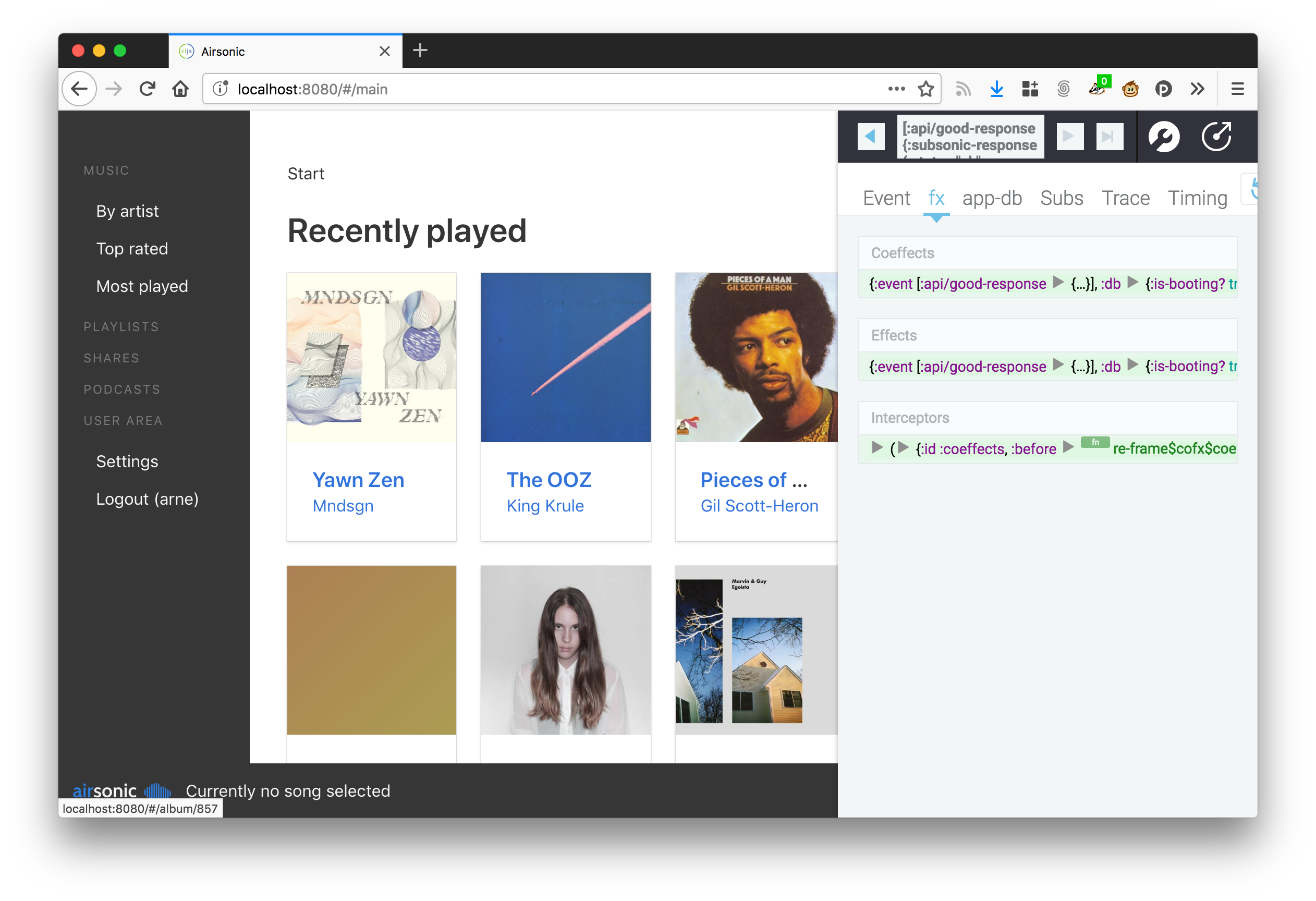
It provides you with tools to inspect the state of the application, undo and replay events, debug performance issues and more.
Tests
This project uses karma for tests. Make sure to have Google Chrome installed, otherwise the watcher will time out. If you want to run tests continuously in the background, you may want to have Growl installed to show notifications (see setup instructions).
# run tests once
$ npm test
Note: If you want nice console output in your tests, make sure to (enable-console-print!). You can call println afterwards like you're used to.
Deployment
# build and optimize the code once for production
$ npm run build

# runs npm run build and publishes everything via gh-pages
$ npm run deploy
All build artifacts will be output in /public. Don't change anything in there as changes will be overwritten.